

Quick Summary
Most annotation tools aren’t built for dermatology, which leads to clunky workflows, poor lesion tracking, and frustration in day-to-day use. Purpose-built solutions fix this by aligning with how dermatologists actually capture, annotate, and compare skin images, making documentation faster, more accurate, and easier to use over time.
Looking for the Right Photo Annotation Tool for Dermatology?
Most annotation software on the market aren't made with skin in mind. They are built for radiology, AI training datasets, or generic photo management, then stretched to cover dermatology as a side use case. That's why so many dermatologists get frustrated after a few weeks with a tool that looked promising in a demo.
The tools in this guide are different. Each one was shaped by how dermatologists actually document skin over time, and that's the metric we used to compare them.
Why Listen to Us?
RxPhoto has spent more than a decade building clinical photography and annotation tools for dermatology and aesthetic practices, from solo skin cancer clinics to multi-location dermatology groups. That work has given us a view of what separates annotation tools dermatologists trust over the years from the ones they drop after a few months.

What Is an Annotation Tool for Dermatology?
An annotation tool for dermatology lets clinicians mark, label, and document findings directly on skin images. It gives structure to the visual side of your work, whether you're tracking mole changes, documenting treatment response, or preparing images for a referral.
Good tools support:
- Markup features designed around skin imaging, not generic photo editing.
- Body mapping for locating lesions accurately across visits.
- HIPAA-compliant storage and sharing by default.
- Integration with your EMR, dermatoscopes, or other imaging hardware.
The weakest tools feel like someone tried to retrofit a generic photo app for clinical use. The strongest ones, like those outlined below, are designed for day-to-day operations in dermatology practices.
The 5 Best Annotation Tools for Dermatologists
Each photo annotation tool in this list is designed for a specific use case and serves different types of dermatology practices. Here’s how they compare at a glance before a deep dive into each one:
1. RxPhoto

RxPhoto was built specifically for aesthetic and dermatology practices, and it shows across the product. The mobile app turns an iPhone or iPad into a clinical photography system, with annotation and markup inside the same workflow as capture. This tight integration saves time for dermatologists documenting treatment response or tracking lesions across repeat visits.
The platform is the strongest fit for aesthetic- or cosmetic-leaning dermatology practices, where marketing-ready before-and-after images matter as much as clinical accuracy.
Key Features
- On-screen guides and photo-ghosting technology help staff align every follow-up with the baseline image.
- Drawing and markup tools let clinicians annotate treatment plans directly on patient photos during consults.
- Customizable diagnosis and treatment tags make images searchable by body region, condition, or visit date.
- HIPAA-compliant cloud storage with encrypted uploads and full audit trails.
- Native integrations with PatientNow, EnvisionNow, Canva, and a WordPress gallery plugin.
Pros
- Users consistently point out how quickly teams can find and compare patient photos.
- Built-in ghost overlay for keeping before-and-after shots aligned across multiple visits.
- Mobile-first design fits the way aesthetic dermatology practices already work.
Cons
- Capture is iOS-only, which matters for teams standardized on Android devices.
2. DermEngine

DermEngine, built by MetaOptima, is one of the few platforms designed around total body photography and lesion surveillance at scale. It captures, tracks, and annotates lesions across the entire body, then links findings to a 3D body map to compare changes over months or years.
For dermatologists running skin cancer clinics or melanoma surveillance programs, this level of coverage is crucial.
Key Features
- AI-assisted lesion mapping and matching to help flag changes between visits.
- Visual Search tool compares lesions against a large labeled dataset for decision support.
- HIPAA-compliant cloud storage with real-time sync across devices.
- Works with MoleScope dermatoscopes and most common imaging hardware.
Pros
- Broad device support lets teams keep using the imaging hardware they already own.
- Built-in teledermatology module supports remote consultations and expert referrals.
Cons
- Some reviewers note that total body photography features are only available on higher-tier plans.
- The breadth of the platform is heavy for smaller clinics that need only basic annotation.
3. HEINE DERManager
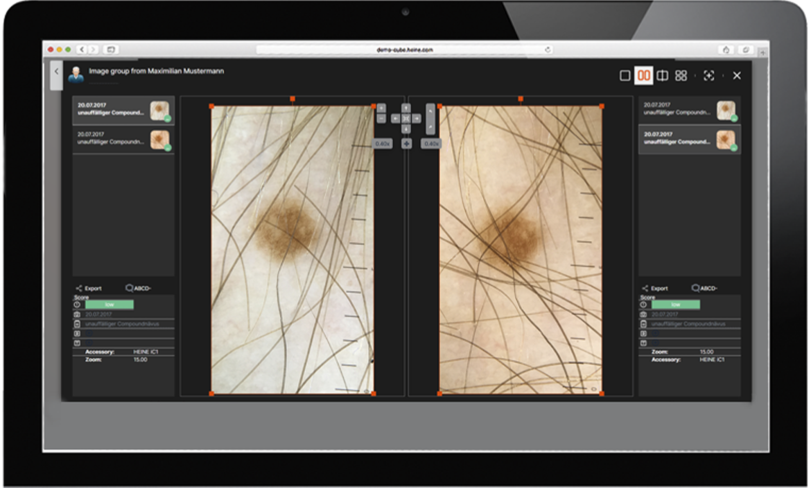
HEINE DERManager is the natural pick for dermatology teams already working with HEINE dermatoscopes. It pairs the iPhone-based DERManager app with the DELTA 30 PRO, DELTA 30, and DELTAone dermatoscopes, creating a direct path from capture to cloud-based annotation.
The software is developed and hosted in Germany, which is important for clinics that care about European data residency standards.
Key Features
- Body map and overview functions place detailed images in a clear anatomical context.
- Side-by-side comparison of up to four images with comments and annotations.
- Triage-friendly image rating system using green, orange, and red flags.
- Unlimited users, devices, and rooms included at no extra cost.
Pros
- No per-seat licensing means larger dermatology teams can scale without budget surprises.
- Cloud sync lets clinicians review dermoscopic images from any computer or tablet.
Cons
- Works best only when paired with HEINE's own dermatoscopes, which require a significant hardware investment.
- Native mobile app is iOS only, which limits Android-based teams.
4. Dermi Atlas
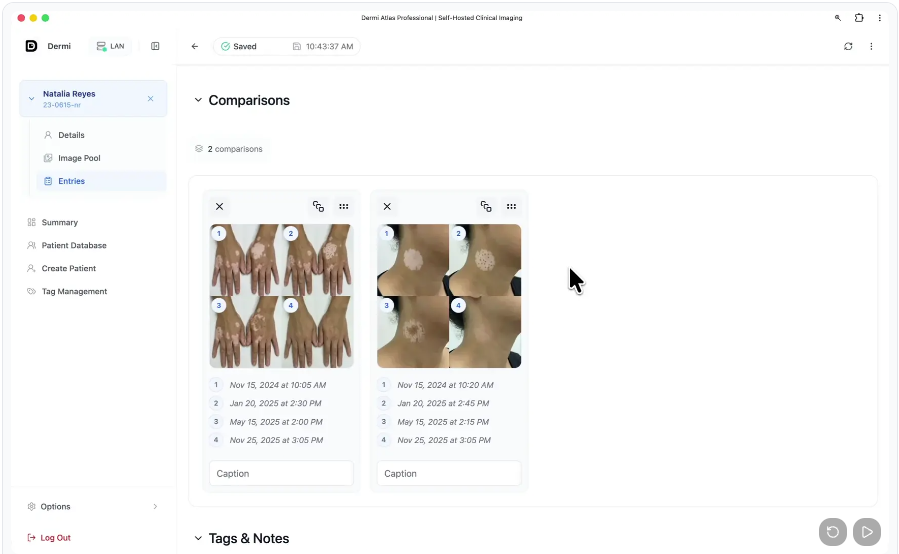
Dermi Atlas takes a different approach from the cloud-first options on this list. It's a self-hosted clinical imaging platform built specifically for dermatology and aesthetic practices, giving clinics full control over where patient data actually lives.
This self-hosted model is a good attraction for privacy-conscious dermatologists or teams operating under strict internal IT rules.
Key Features
- Tagging by condition, body location, and treatment phase for fast retrieval during consults.
- Side-by-side comparisons with automatic alignment and opacity controls.
- Clinical notes and PDF report generation for patients or referring physicians.
- Isolated accounts per clinician with audit logging across the system.
Pros
- A free Cloud tier lets practices try the platform before committing to Professional.
- Atlas Manager desktop app handles backups, certificates, and system monitoring.
Cons
- Self-hosting requires some internal IT capacity to deploy and maintain.
- Fewer public user reviews than the more established platforms on this list.
5. Canfield Mirror
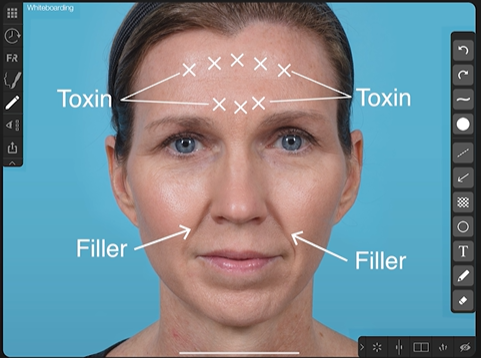
Canfield is an established player in dermatology and aesthetic imaging, with Mirror as the flagship suite. It bundles PhotoFile for image management, PhotoTools for annotation, and optional modules for body mapping and aesthetic simulation.
The platform is tightly coupled to Canfield's imaging hardware, including VECTRA, VISIA, Reveal, and IntelliStudio systems.
Key Features
- Whiteboarding and markup tools for annotating images directly during patient consults.
- Calibrated measurement tools for distances, angles, and surface areas on skin.
- MatchPose technology overlays a baseline image during live capture for positioning.
- Body Mapping module designed for pigmented lesion tracking across visits.
Pros
- Mature platform with strong adoption across dermatology and plastic surgery.
- Simulation tools help patients visualize aesthetic outcomes during planning.
Cons
- Offers value only when paired with Canfield's imaging hardware, which is a large investment.
- Cloud storage isn't supported for the live data copy, which matters for infrastructure planning.
How to Choose the Right Annotation Tool for Dermatologists
The best annotation tool for dermatologists depends on where your practice focuses. Determine if your work leans more toward aesthetic dermatology, skin cancer surveillance, or general medical dermatology, because each one favors a different kind of tool. Here’s how to do that:
- For aesthetic-focused dermatology practices, a mobile-first tool like RxPhoto makes the most sense. The annotation exists where the photography happens, and marketing features fold in naturally.
- For skin cancer clinics, DermEngine is a strong choice. The 3D body mapping and lesion matching are built for exactly this work.
- For teams already invested in HEINE dermatoscopes, HEINE DERManager is the cleanest extension of what you already own. If you’re just starting out, consider whether the upfront investment is worth it for your clinic.
- For practices that need data on their own infrastructure, Dermi Atlas gives you the self-hosted option without stripping out clinical features.
- For larger clinics running dedicated imaging rooms, Canfield Mirror makes sense when you’ve considered hardware investment. Otherwise, RxPhoto offers a more affordable option with a professional image capture and annotation suite that runs on iPhones and iPads.
Beyond workflow fit, check HIPAA compliance, EMR integration, and how quickly your team can adopt the tool. A good tool, like RxPhoto, gets out of your way and lets you focus on the patient in front of you.
Annotation Is More Than Documentation
Annotation is part of how dermatologists build trust over time, not just a documentation step. Every marked lesion, labeled baseline, and comparison pulled up during a follow-up tells your patient that their skin has been watched carefully.
What separates RxPhoto from the rest is how flawlessly annotation fits into the workflow. Instead of being a separate task after capture, it happens in the same moment, on the same device, without slowing the clinician down. Features like ghosting overlays, structured tagging, and mobile-first capture make it especially effective for practices that rely on consistent follow-ups and visual results.
If you want to see how a purpose-built platform handles it, book a demo with RxPhoto and walk through it with your own workflow in mind.
Frequently Asked Questions
Can I Use an Annotation Tool Without Buying Specialized Imaging Hardware?
Yes. You can. Mobile-first tools like RxPhoto run on an iPhone or iPad without extra equipment. Others like HEINE DERManager or Canfield Mirror only deliver their full value when paired with their own dermatoscopes or imaging systems.
Do I Need a Standalone Annotation Tool or a Full EHR?
It depends on your setup. Standalone tools like RxPhoto focus on clinical photography and annotation, and they integrate with EHRs your practice may already use. Whereas full EHR suites bundle annotation inside larger platforms.
Can annotation tools integrate with my existing EHR system?
Many do, though compatibility varies by platform. RxPhoto integrates natively with PatientNow and EnvisionNow, so dermatology practices on these systems get both annotation and EMR sync in one workflow.
How Do Annotation Tools Handle HIPAA Compliance for Skin Photos?
Reputable tools encrypt images in transit and at rest, store them on HIPAA-compliant servers, and log every access for audit purposes. RxPhoto also adds two-factor authentication and never stores patient photos on the capture device itself.
Explore this post
Book a demo to see RxPhoto in action