

Quick Summary
Plastic surgeons often struggle with annotation tools that are either too basic or buried inside complex systems, making it hard to document procedures clearly and keep workflows efficient. Purpose-built solutions solve this by combining precise image markup, consistent photo capture, and seamless integration with patient records, making consultations clearer, documentation stronger, and follow-ups easier.
Looking for the Right Photo Annotation Tool for Plastic Surgery?
Plastic surgeons use photo annotation tools for everything from marking injection sites to planning surgical incisions. But not every tool handles annotation the same way. Some are dedicated imaging platforms, while others bundle annotation into a larger EHR or consultation workflow.
In this guide, we compare five of the best image annotation tools for plastic surgeons, so you can find the one that fits how your practice actually works.
Why Listen To Us?
RxPhoto has spent more than a decade building clinical photography and annotation tools for aesthetic practices, from solo providers to large multi-location clinics. That work has given us a close view of what separates the annotation tools that plastic surgeons stick with from the ones they abandon.

What Is Image Annotation in Plastic Surgery?
Image annotation is the process of adding visual markers like arrows, labels, measurements, and treatment indicators directly onto clinical images. In plastic surgery, it serves as a communication tool that brings clarity to every stage of the patient journey, from the initial consultation through post-operative follow-ups.
Common annotation use cases include:
- Marking injection sites: Logging precise unit counts and placement for neurotoxins and fillers, reducing variability across repeat treatments and staff.
- Surgical cut lines: Drawing proposed incision paths directly on preoperative photos, giving patients a clear visual roadmap before they ever enter the operating room.
- Laser focus areas: Identifying and mapping treatment zones on clinical images, ensuring consistent targeting across sessions and providers.
When annotation is built into a consistent workflow, it reduces time spent during consultations, strengthens informed consent, and improves documentation accuracy. There’s also a clear visual record for follow-ups and revisions. Additional benefits include reduced variability across providers and better collaboration between staff and specialists.
The 5 Best Image Annotation Tools for Plastic Surgeons
Before breaking down each tool individually, here’s a side-by-side snapshot of how all five compare across the features that matter most to plastic surgery practices:
1. RxPhoto

RxPhoto is a clinical photography and annotation platform built exclusively for aesthetic practices. It also integrates natively with PatientNow and EnvisionNow, which many practices already use as their EHR.
That combination gives you the annotation depth of a dedicated imaging tool and the connectedness of an EHR-embedded workflow. You don't have to choose between the two.
Broader EHR platforms treat annotation as one feature among many. RxPhoto treats visual documentation as the core product. It’s annotation tools are purpose-built for aesthetic use cases and flow directly into the patient records your team already works from.
Key Features
- Customizable annotation tools for marking injection sites, surgical lines, and laser treatment areas directly on patient images.
- Precise injection tracking with flexible unit options (mL, syringes, cycles) tied directly to annotated photos.
- Dynamic before-and-after comparisons with side-by-side, slider, and morphing visualization tools.
- Dedicated consultation center for presenting annotated galleries in real time.
Pros
- Purpose-built for aesthetics, with deeper annotation and before-and-after tooling than most EHR-embedded options.
- HIPAA-compliant, secure storage with encrypted, audit-ready access across teams.
- Flexible integrations with EMRs (including PatientNow and EnvisionNow) and tools like Canva for extended use of annotated images.
Cons
- Practices using EHRs outside the PatientNow and EnvisionNow ecosystem will get less workflow integration out of the box.
2. TouchMD
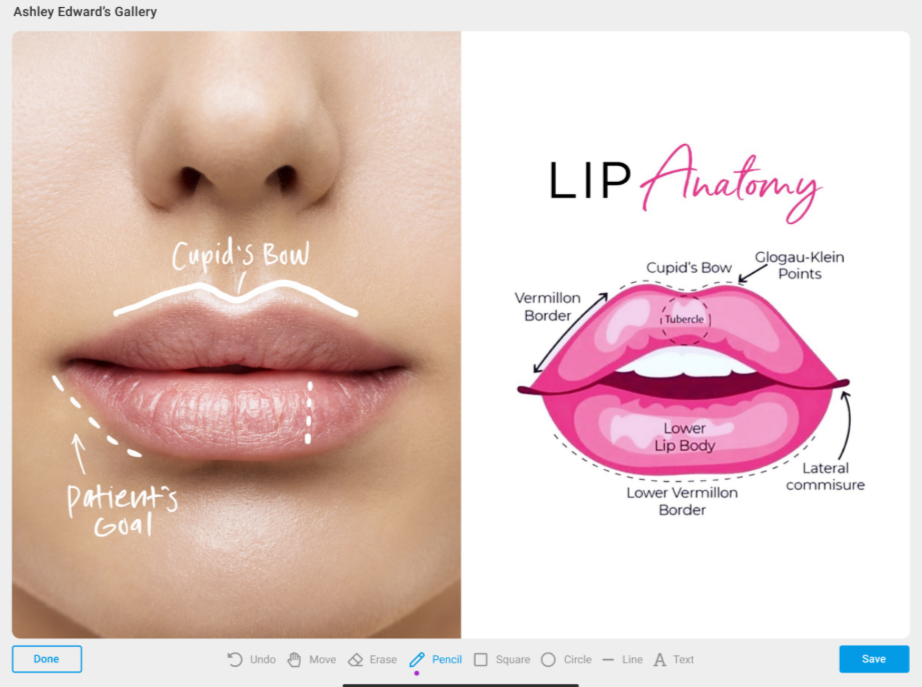
TouchMD is a patient engagement and clinical photography platform built around the consultation experience. It operates through a modular suite of connected apps, with Snap handling photo capture, Consult for in-room annotation and presentation, and a patient-facing app (myTouchMD).
Annotated images created during the consultation are automatically saved to the patient’s myTouchMD timeline. This allows them to review treatment plans, markups, and recommendations from home.
Key Features
- Real-time freehand drawing and annotation tools for marking up patient photos directly during consultations on touchscreen devices.
- Consistent clinical photography through TouchMD Snap, with overlays, gridlines, and ghosting tools to ensure consistency.
- 30+ integrations with leading practice management and EMR platforms, keeping annotated photos connected to patient records.
Pros
- Snap and Consult together create a seamless capture-to-annotation workflow without switching platforms.
- Unlimited per-location device licenses for Consult, so scaling across rooms or providers doesn't add per-seat costs.
Cons
- Annotation is built around the consultation workflow, limiting its usefulness for post-operative markup outside of scheduled visits.
- Leans heavily toward patient education and engagement, so practices looking for strong documentation tools may find it lacking.
3. Symplast
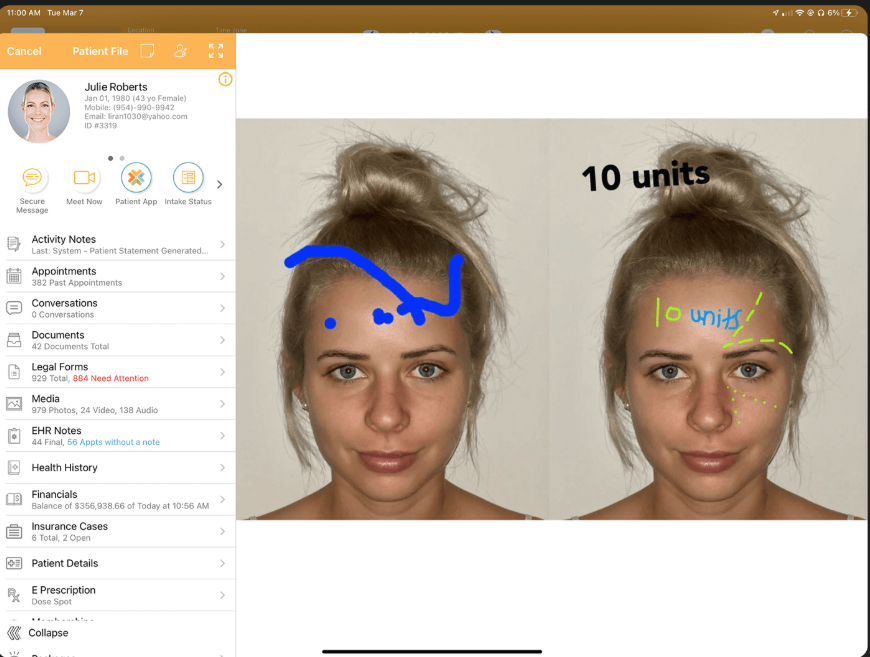
Symplast is a mobile-first EHR and practice management platform built for plastic surgery practices and med spas. It covers scheduling, billing, charting, secure messaging, and patient engagement from a single mobile app.
The ecosystem also includes a media management suite with image annotation, markup, and before-and-after comparison tools. For practices that want a single suite for everything, Symplast eliminates the need to stitch together separate imaging and EHR tools.
Key Features
- Image editor with markup tools, resizing, filters, and redaction for controlling how patient photos are documented and presented.
- Cloud-based media management that organizes patient photos into tagged, searchable albums accessible from mobile devices.
- HIPAA-secure texting and media sharing for sending annotated images directly to patients.
Pros
- Built by a plastic surgeon, so workflows reflect the day-to-day operations of aesthetic practices.
- 10TB of included storage per cloud instance, so photo and video archiving does not create surprise overage costs.
Cons
- Annotation capabilities are not as deep as dedicated imaging platforms, meaning practices that rely on precise measurement may find the markup suite limited.
- Multiple user reviews on Capterra and Software Advice note that frequent software updates occasionally disrupt established workflows.
4. ModMed EMA
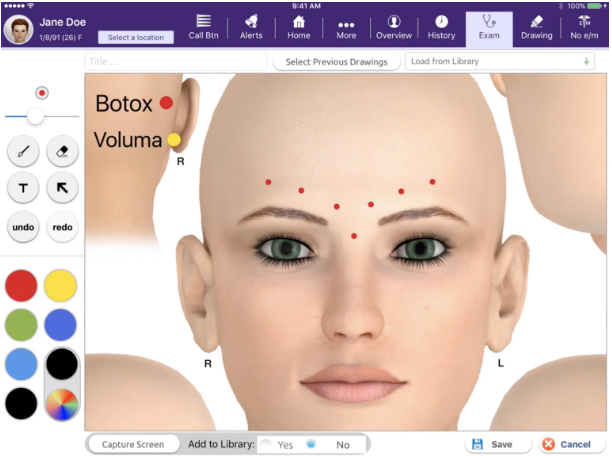
ModMed EMA is a cloud-based, iPad-native EHR built for specialty medical practices, including a plastic-surgery-specific version. Its visual documentation suite combines photo storage, freehand drawing tools, a 3D Interactive Anatomical Atlas, and integrated photography into a single system.
The platform offers good depth of anatomical visualization. It’s 3D atlas covers over 15,000 anatomical touchpoints and lets surgeons peel back layers from skin to muscles and joints, with annotations at each level. This level of granularity is ideal for complex surgical planning.
Key Features
- Freehand annotation tools for marking injection sites, unit counts, and incision plans directly on patient photos or anatomical diagrams.
- Integrated iPad photography capturing up to 30 images per session, automatically linked to the patient visit.
- Adaptive learning engine that remembers individual surgeon preferences for exam descriptions, procedures, and prescriptions.
Pros
- Adaptive learning engine that remembers surgeon preferences to speed up documentation.
- Built for plastic surgeons, with specialty-specific templates, ICD-10 codes, and minimal setup required.
Cons
- Multi-specialty design may feel too broad for practices focused only on aesthetics.
- Enterprise-level complexity can mean a steeper learning curve for smaller practices.
5. Canfield Mirror
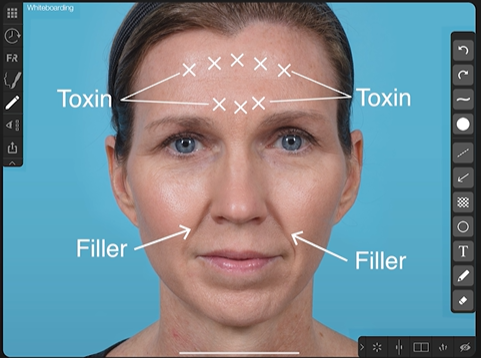
Canfield Mirror is a medical imaging platform that has been an industry standard in clinical photography for decades. Its modular system combines image capture and management (PhotoFile), annotation and measurement tools (PhotoTools), and 2D aesthetic simulation (Rejuvenation) into a configurable suite.
Canfield’s key differentiator is imaging precision. Its calibrated measurement tools capture exact distances, angles, areas, and proportions directly on clinical images, making it a strong fit for surgical planning.
Key Features
- Whiteboarding and annotation tools for adding notes, measurements, and procedure markers directly on patient images.
- MatchPose image overlay for consistent patient positioning across before-and-after sessions.
- 2D simulation tools for previewing outcomes of neurotoxins, fillers, laser procedures, and surgical procedures.
Pros
- Established clinical imaging platform with strong adoption in academic settings, high-volume practices, and clinical research environments.
- Mirror Mobile iPad app extends consultation tools to anywhere in the facility.
Cons
- The core Mirror platform runs only on desktop (Windows) and requires specific hardware, network, and server configurations.
- Practices will need separate platforms for charting, scheduling, and billing, with integration options more limited compared to RxPhoto or Symplast.
How to Choose the Right Image Annotation Tool
Choosing between these five tools depends on how annotation fits into your broader practice workflow. Start by asking whether you need a standalone annotation tool or an annotation built into a larger system for charting, billing, and scheduling.
From there, consider these factors:
- Team size and capture consistency: Practices where multiple staff members handle photo documentation need standardized workflows and role-based access to stay consistent.
- Consultation conversion: For practices focused on closing patients, RxPhoto presents annotated before-and-after photos in real time, giving patients the visual clarity they need
- Surgical complexity: Detailed pre-operative planning calls for calibrated measurement tools that capture precise distances, angles, and proportions directly on clinical images.
Annotation That Moves Patients Forward
The right annotation tool for plastic surgeons doesn't stop at image markup. It documents your work accurately, communicates your plan visually, and builds the kind of trust that keeps patients coming back. In plastic surgery, how you present results matters as much as the results themselves, and your documentation should reflect that.
RxPhoto makes annotation part of a complete, connected workflow. Instead of treating it as an add-on feature, it offers purpose-built tools for marking injection sites, surgical plans, and treatment areas. It also pairs this with consistent photo capture and powerful before-and-after comparisons. Everything ties directly into patient records and integrates with systems like PatientNow and EnvisionNow, so your team isn’t switching between platforms.
If you want a tool that improves both documentation and patient communication, book a demo and see how it fits into your daily workflow.
Frequently Asked Questions
Is photo annotation the same as photo editing?
No. Editing adjusts image quality (brightness, contrast, cropping). Whereas annotation adds clinical information on top of the image to support documentation and communication.
What features should I look for in a photo annotation tool?
Look for freehand drawing tools, measurement capabilities, before-and-after comparison views, standardized photo capture, and integration with your existing EHR or practice management system.
How is photo annotation different from 3D imaging simulation?
Annotation marks up actual patient photos for documentation and communication. Whereas 3D simulation creates predictive models of potential surgical outcomes for visualization purposes.
Do I need a standalone annotation tool or a full EHR system?
It depends on your workflow. Standalone tools like RxPhoto focus on clinical photography and annotation. It also integrates natively with PatientNow and EnvisionNow, so practices on those EHRs get both. While platforms like ModMed and Symplast include annotation as part of a broader EHR system.
Explore this post
Book a demo to see RxPhoto in action