

How to Take HIPAA-Compliant Photos on iPhone
Quick Summary
Your iPhone's native camera stores patient photos unencrypted, syncs them to iCloud (which won't sign a BAA), and surfaces them through facial recognition, widgets, and Memories. To stay compliant, capture images through a HIPAA-compliant app, disable iCloud Photos, lock down device settings, and collect consent before every shot.
Your iPhone isn’t HIPAA-Compliant By Default
You take a patient photo on your iPhone. Within seconds, it's in your camera roll, backed up to iCloud, tagged by facial recognition, and one shared album away from a breach. Most practice owners don't realize how many iPhone features work against them every time they photograph a patient.
HIPAA fines for photo-related violations can climb into six or seven figures, and they're assessed per violation, not per incident. A single unprotected device with dozens of patient images creates exposure that scales rapidly.
This guide breaks down how to lock down your iPhone for clinical photography, step by step. So you can keep using the device your team already carries without putting your practice at risk.
Why Listen to Us
At RxPhoto, HIPAA-compliant clinical photography is what we do. Our app was purpose-built for aesthetic practices that need to capture patient photos on mobile devices without the risks that come with using the native iPhone camera. That's why industry leaders choose RxPhoto for professional, protected patient photography. Because RxPhoto already handles secure capture, storage, and compliance by default, many of the manual steps outlined in this guide aren’t necessary when using our platform.
How to Take Compliant Photos With an iPhone Step-by-Step
Taking HIPAA-compliant photos on your iPhone comes down to six steps. Most are one-time setup tasks. Once your devices, settings, and workflows are configured correctly, compliant capture becomes the default rather than something your team has to think about with every patient. Here’s a step-by-step guide to capture HIPAA-compliant photos with your iPhone:
Step 1: Stop Photos From Reaching Your Camera Roll
The single biggest compliance risk with using an iPhone for patient photography is the native camera itself. Every image it captures goes straight into your photo library. From there, your iPhone syncs, indexes, and redistributes that image across the device.
This is what happens to a patient photo sitting in your camera roll:
- iCloud Photo Library uploads it to Apple's servers. Apple's terms of service make clear that iCloud cannot be used in connection with protected health information, and Apple will not enter into a Business Associate Agreement for the service.
- People & Pets album scans the image using facial recognition and groups it with other photos of that person.
- Memories and Sharing Suggestions pull the image into auto-generated slideshows and recommend sharing it with contacts.
- Widgets and StandBy mode can display the image on your home screen, lock screen, or charging display.
To prevent all of this:
- Use a HIPAA-compliant capture app like RxPhoto that saves images to encrypted storage and never touches the camera roll.
- Turn off iCloud Photos (Settings > [Your Name] > iCloud > Photos).
- Disable Shared Albums and iCloud Shared Photo Library so patient images can't reach linked Apple IDs.
- Remove the Photos widget from your home screen and lock screen.
If a photo ends up in the camera roll by mistake, delete it from the main library. Then remove it from the Recently Deleted folder, where images are stored for 30 days before permanent deletion.
Step 2: Lock Down Your iPhone Settings
Even with a compliant capture app handling your photos, the iPhone itself has default settings that can expose patient data. So, change the following settings to keep your device compliant:
- AirDrop: Switch to "Receiving Off" or "Contacts Only." When set to "Everyone," any nearby Apple device can attempt to push files to yours.
- Lock Screen previews: Turn off notification previews so patient-related alerts from your capture app, messaging apps, or email don't display on a device that's sitting on a treatment room counter.
- Siri: If any patient images are in your camera roll, Siri can search and surface them by voice. Disable Siri's access to Photos, or better yet, keep patient images out of the camera roll entirely (as in Step 1).
- Auto-Lock: Set to the shortest interval that's practical for your workflow. Every minute the screen stays unlocked while unattended is an open risk.
- Face ID/Passcode: iPhone encryption is tied to the passcode. Without one enabled, a lost device has no encryption protecting the data on it, turning a lost phone into a reportable breach.
If your practice issues iPhones to staff, a Mobile Device Management (MDM) system lets you enforce all of these settings centrally and wipe a device remotely if it's lost or stolen.
Step 3: Standardize How Your Team Captures Images
Solving the storage problem doesn't solve the consistency problem. If every staff member holds the phone at a different angle, uses different lighting, and frames the shot differently, your before-and-after photos become inconsistent. This makes them unreliable for tracking treatment progress and building a gallery that patients actually want to see.
Every member of your team who photographs patients should follow a documented standard covering positioning, lighting, distance, and framing. Without one, the photo becomes inconsistent as staff rotate through shifts.
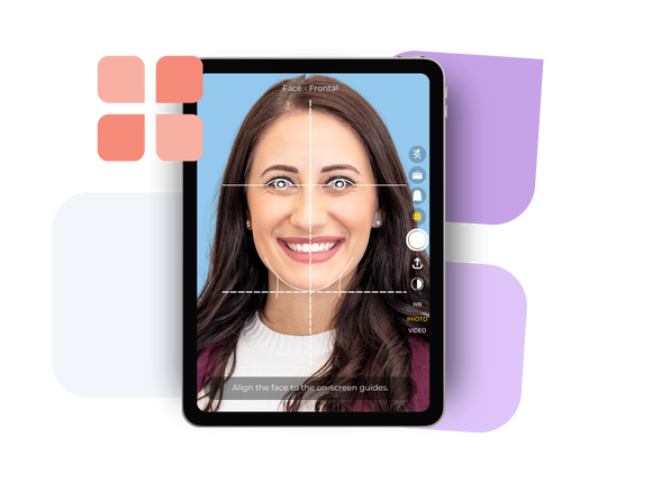
Here, RxPhoto's guided photography tools can walk your staff through each shot with on-screen positioning guides and ghost overlays. It can keep every capture consistent regardless of who's holding the phone.
Step 4: Capture Consent Before the First Photo
Photographing a patient without documented consent is a HIPAA violation. Collecting it after the fact creates a gap you can't defend during an audit, because there's no way to prove the patient authorized the image at the time it was taken.
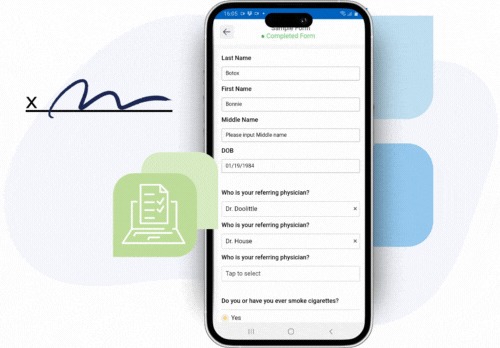
So, consent needs to be part of the capture workflow itself. If it's a separate step your team has to remember, it will eventually get skipped. But RxPhoto handles this by building digital consent capture directly into the photography sequence, so authorization is recorded before the camera activates.
Step 5: Maintain an Audit Trail
Following a compliant process matters, but so does being able to prove you followed it. If a breach occurs or an audit is triggered, your practice needs clear records showing:
- Who captured, viewed, or shared each patient image.
- When those actions happened.
- Whether consent was documented before capture.
If your practice allows staff to use their own iPhones (BYOD), create a written policy specifying approved apps and required device settings. Include rules for how patient data is handled when a staff member leaves the practice.
There’s no doubt that a complete activity log is the difference between a smooth audit and an expensive penalty. RxPhoto automatically tracks access and activity across your entire photo documentation, giving you an audit-ready record without any manual logging.
Build a Compliant iPhone Workflow From Day One
Your iPhone is only as HIPAA-compliant as the workflow around it. Bypassing the camera roll, locking down device settings, standardizing capture, embedding consent, managing device ownership, and maintaining an audit trail all work together. Skip one, and the others lose their protection.
But RxPhoto was built to handle each of these steps for aesthetic practices that photograph patients on mobile devices every day. Your staff can capture perfectly aligned, clinic-grade before-and-after photos directly in the app without using the camera roll. Digital consent is also collected and linked automatically to each patient record, images are stored securely in HIPAA-compliant cloud storage, and an audit trail tracks every action. So, schedule a demo to see RxPhoto in action.
Frequently Asked Questions
Can I Use My iPhone's Native Camera for Patient Photos?
You can, but it's not compliant out of the box. The native camera saves everything to your camera roll, where it syncs to iCloud, gets tagged by facial recognition, and surfaces in widgets and Memories. But a HIPAA-compliant capture app like RxPhoto bypasses the camera roll and eliminates these risks.
Does Apple's Encryption Make iCloud Safe for Patient Photos?
No. Encryption alone doesn't satisfy HIPAA. You need a signed Business Associate Agreement with any service handling patient data, and Apple won't sign one for iCloud.
Should My Practice Use Dedicated iPhones or Let Staff Use Their Own?
Dedicated devices are safer because you control the configuration and can wipe them remotely. If staff use personal iPhones, you need a written BYOD policy, MDM enrollment, and clear rules about approved apps and required settings.
Are Med Spas Required to Follow HIPAA for Photography?
If your med spa stores or transmits protected health information, which includes patient photos tied to treatment records, then yes. Whether HIPAA applies depends on the services you offer and how you handle patient data.
Explore this post
Book a demo to see RxPhoto in action